Procol
B2B SaaS for procurement management
Vendor Onboarding: Enhancing usability and scalability
- Team
- 1 PM, 7 Devs, 1 Designer
- My role
- Wireframing, Visual Design, Prototyping, Collaborating with PM, Devs, and CS
- Platform
- Web
- Timeline
- Jun – Jul 2024 (2 months)
Context
About Procol
Procol is a B2B SaaS platform for procurement management. Procurement is how a company buys the goods and services it needs from its vendors, and managing those vendors is one of its most important parts.
A typical vendor onboarding flow looks like this:
- DoneVendor Onboarded
Why vendor onboarding needed a revamp
Existing clients kept raising the same problem, in user interviews and in support tickets: vendors were hard to manage on the platform, and onboarding one took too long.
Our goal was to cut that time, so we set out to redesign vendor onboarding.
User Personas

Procurement Manager (Buyer)
Goals / Jobs
- Onboard vendors who meet company requirements & compliances
- Monitor vendor performance and manage the relationship
Motivation
- Cost Saving
- Risk Mitigation
Pain points
- Time-consuming verification process
- Managing inaccurate or outdated information
- Low visibility in the vendor performance

Vendor (Supplier)
Goals / Jobs
- Submit all the accurate info & documents required for onboarding
- Keep information and documents up-to-date after onboarding
Motivation
- Business growth
- Long-term collaboration
Pain points
- Complicated onboarding process
- Lack of transparency in onboarding status
- Unable to update info post-onboarding
Pre-requisite
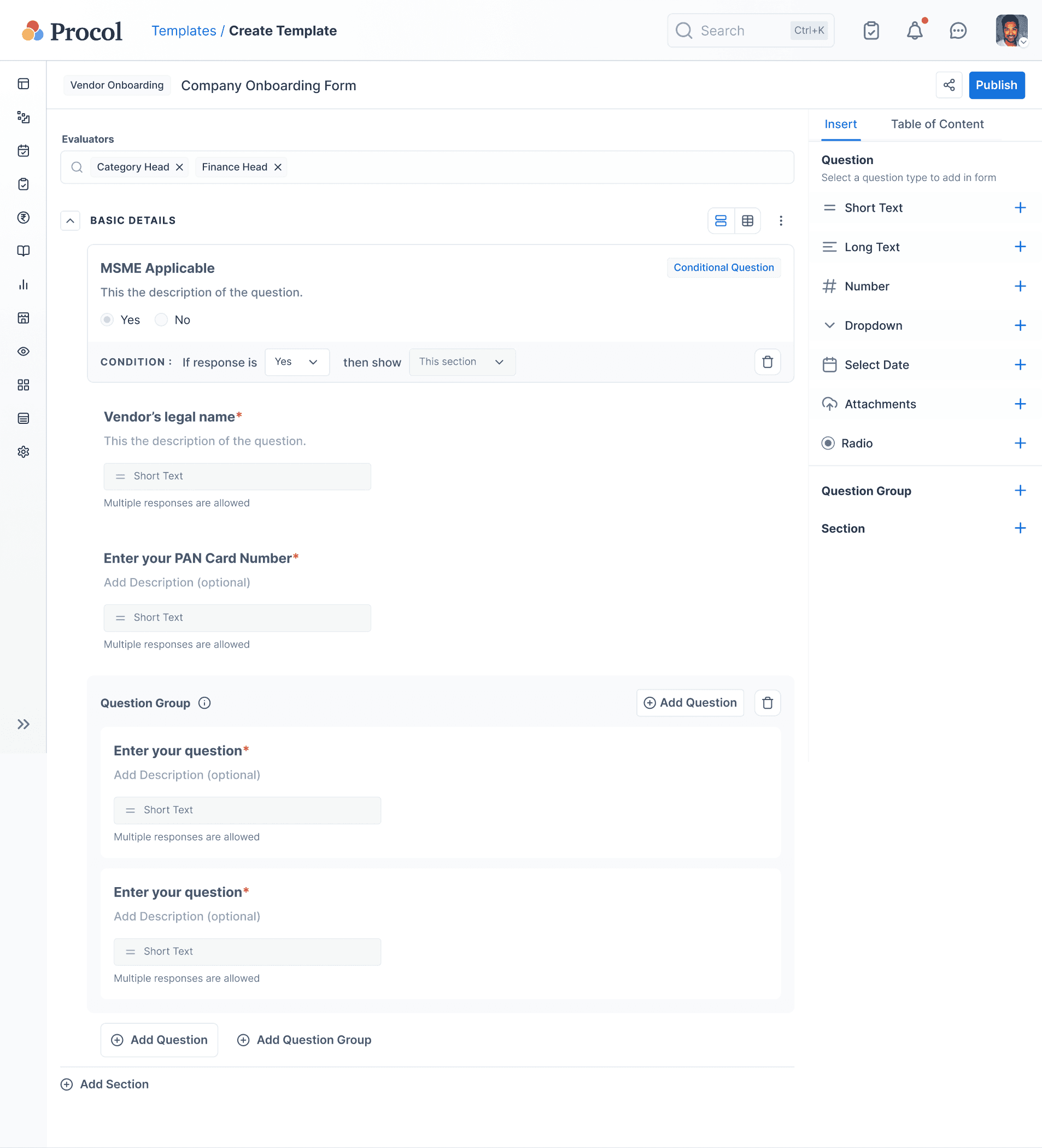
Creating Onboarding Form
Before onboarding starts, the buyer builds a form to collect vendor details and compliance documents.
Problem → Solution
What changed
- Buyer
Auto-verified via APIs
Checking GST, PAN and MSME details manually
Manual effortData accuracy - Buyer
Edit questions in one place
Updating a question requires switching context
InteractionContext switching - Vendor
Conditional & grouped questions
Answering questions that are not relevant
Cognitive load
| User | Problem | Problem type | Solution |
|---|---|---|---|
Buyer | Checking GST, PAN and MSME details manually | Manual effortData accuracy | Auto-verified via APIs |
Buyer | Updating a question requires switching context | InteractionContext switching | Edit questions in one place |
Vendor | Answering questions that are not relevant | Cognitive load | Conditional & grouped questions |
Solution
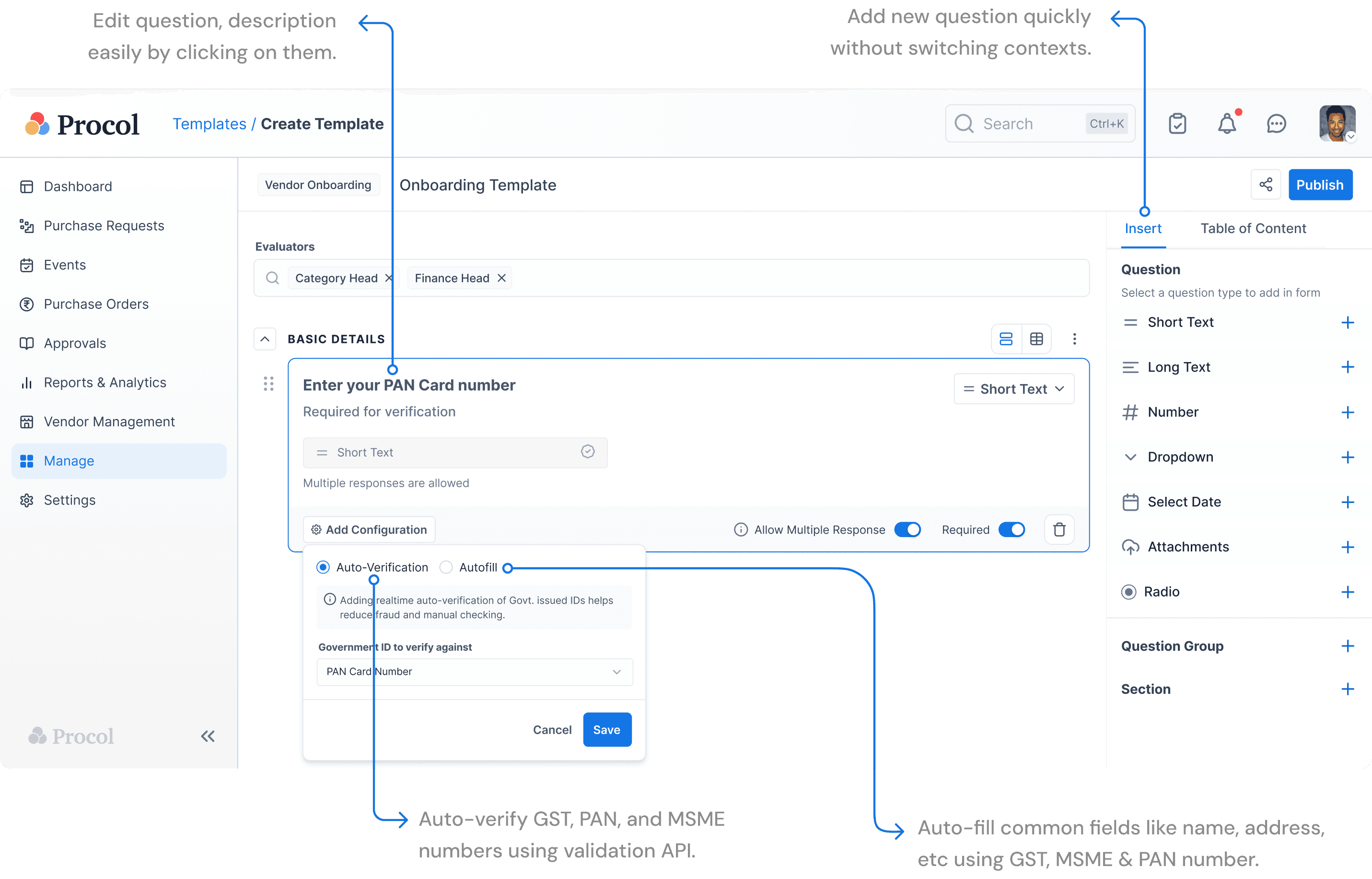
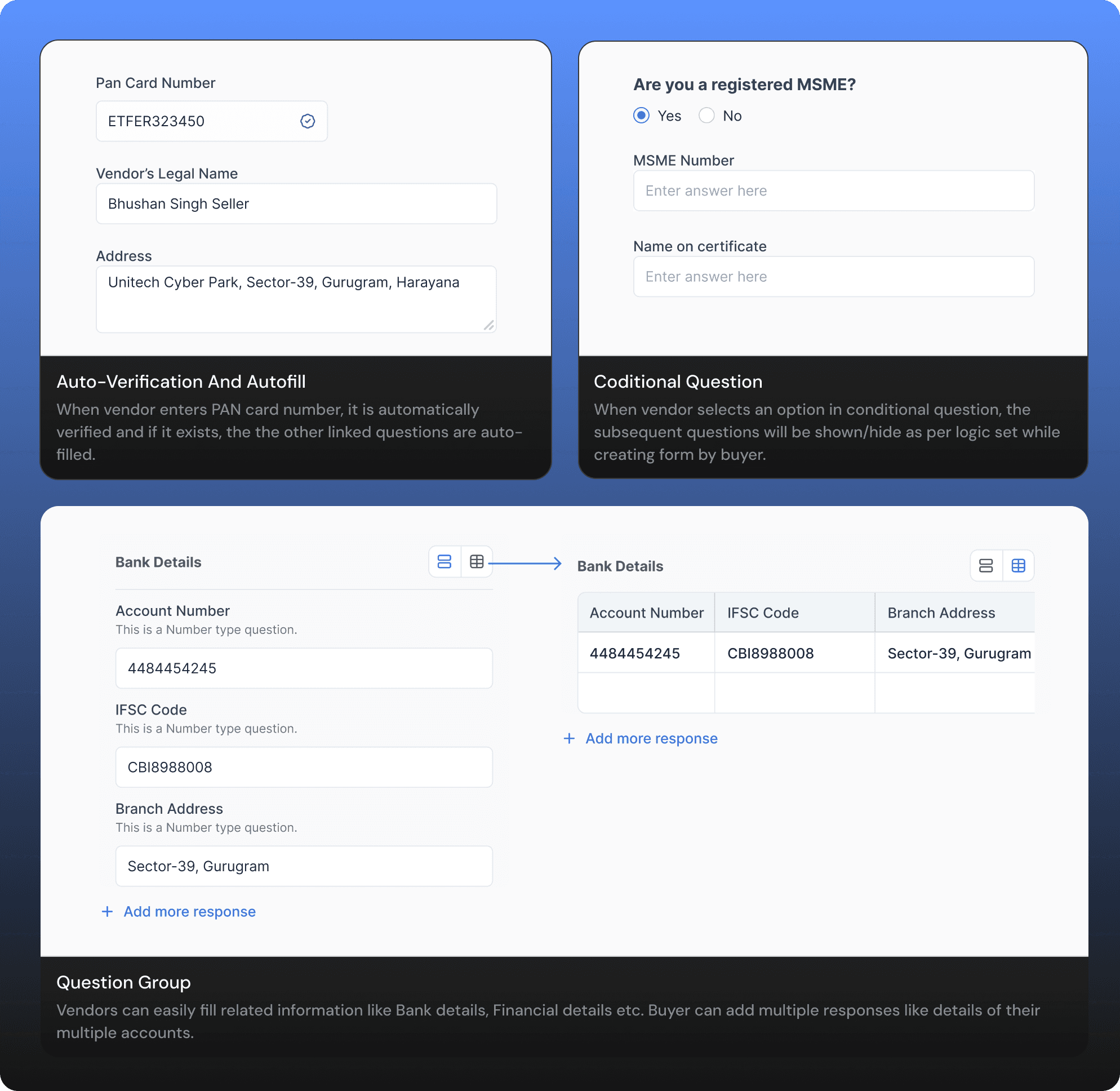
Making Verification Automatic
GST, PAN and MSME numbers are checked against 3rd-party APIs, and linked answers fill themselves in.
Solution
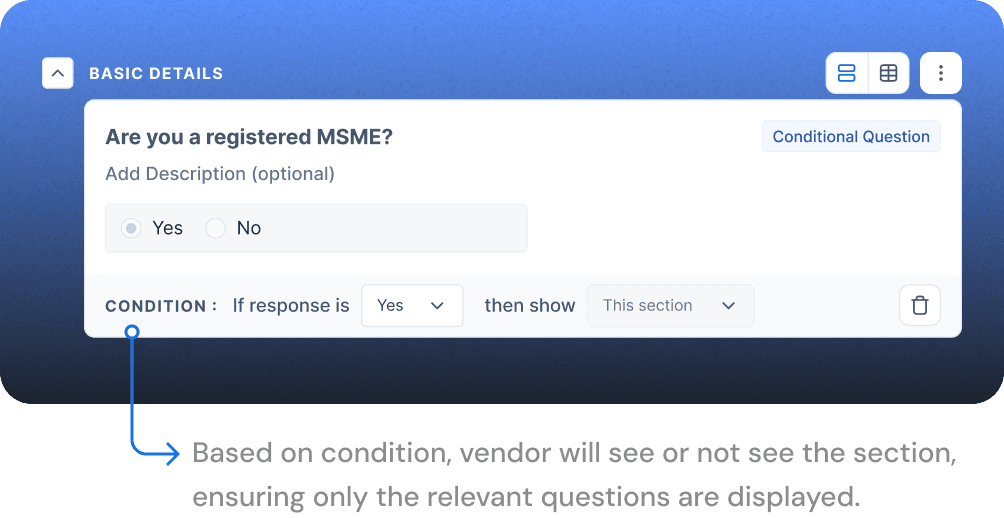
Dynamic forms & grouped questions
A conditional question shows or hides a section based on the vendor's answer.
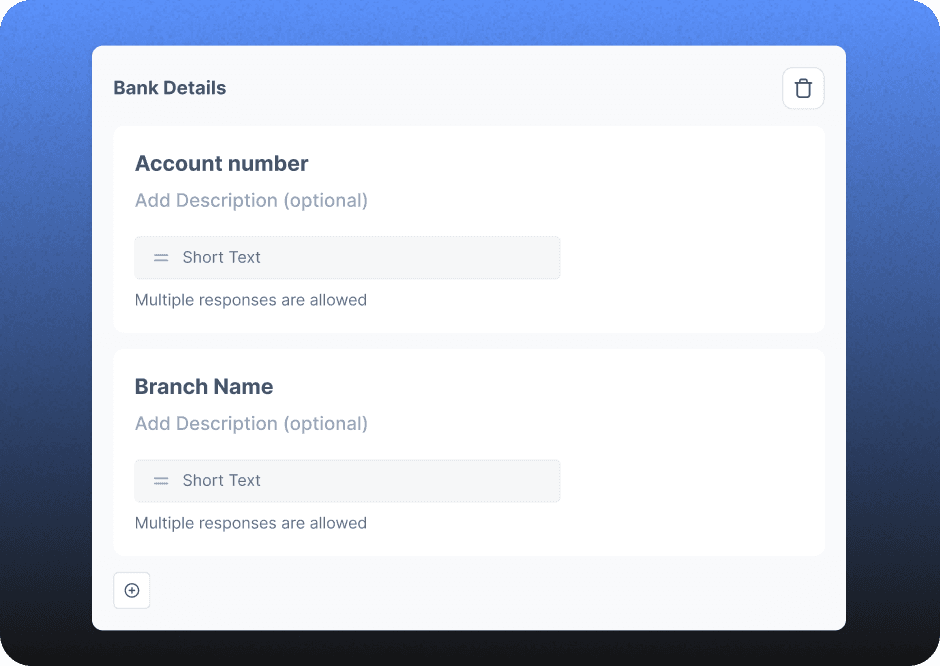
Linked questions, like bank details, sit together so the form is easier to scan.
Step 1
Initiating Onboarding
The buyer invites vendors to fill out the onboarding form.
Problem → Solution
What changed
- Buyer
Pick vendors from vendor management
Buyers juggled two screens to pick which vendors to onboard.
WorkflowMemory load - Buyer
Onboarding in Progress tab
Checking progress meant opening every onboarding event.
VisibilityNavigation - BuyerVendor
Per-vendor deadlines
Extending one vendor's deadline extended it for everyone.
System logicClarity
| User | Problem | Problem type | Solution |
|---|---|---|---|
Buyer | Buyers juggled two screens to pick which vendors to onboard. | WorkflowMemory load | Pick vendors from vendor management |
Buyer | Checking progress meant opening every onboarding event. | VisibilityNavigation | Onboarding in Progress tab |
BuyerVendor | Extending one vendor's deadline extended it for everyone. | System logicClarity | Per-vendor deadlines |
Solution
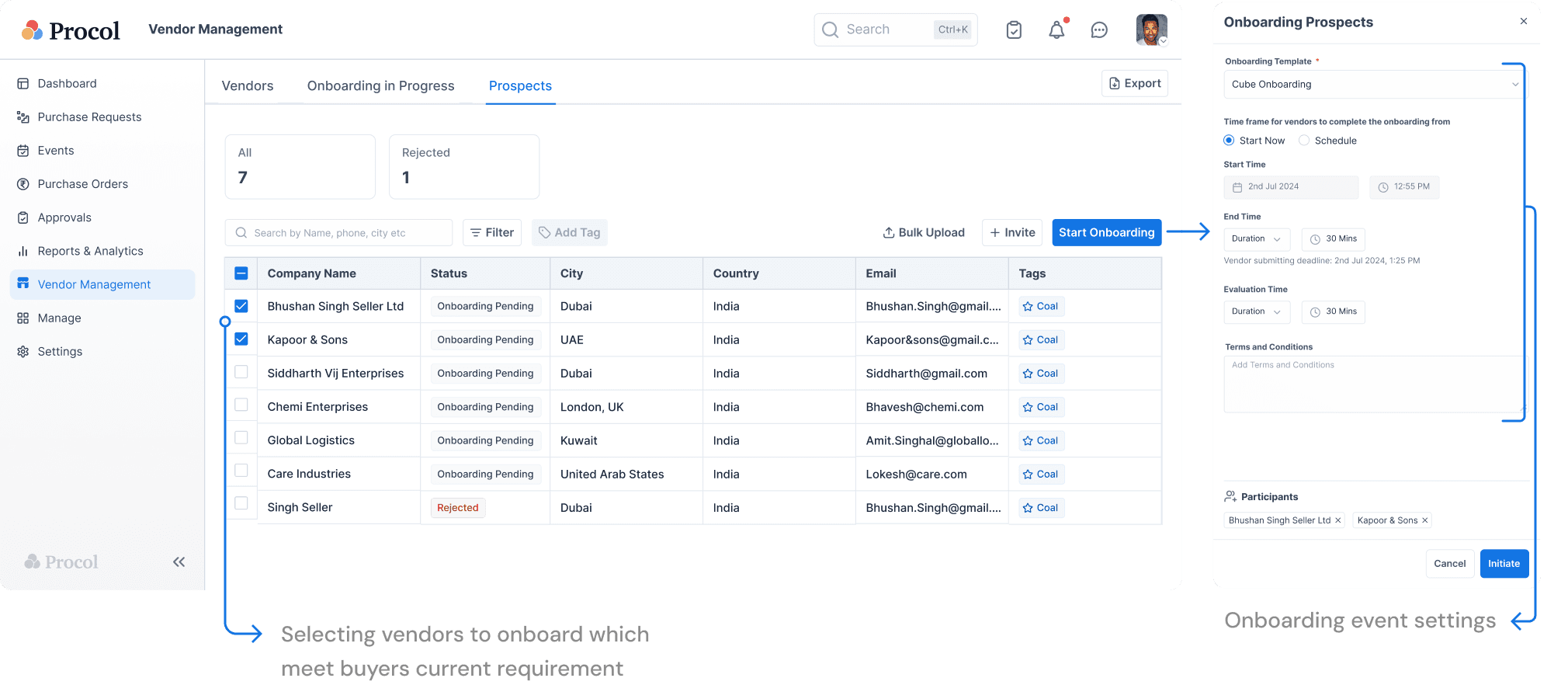
Rethinking The Onboarding Initiation Flow
Changing the existing event flow would have touched every feature on the platform, so vendor management became the new starting point.
Solution
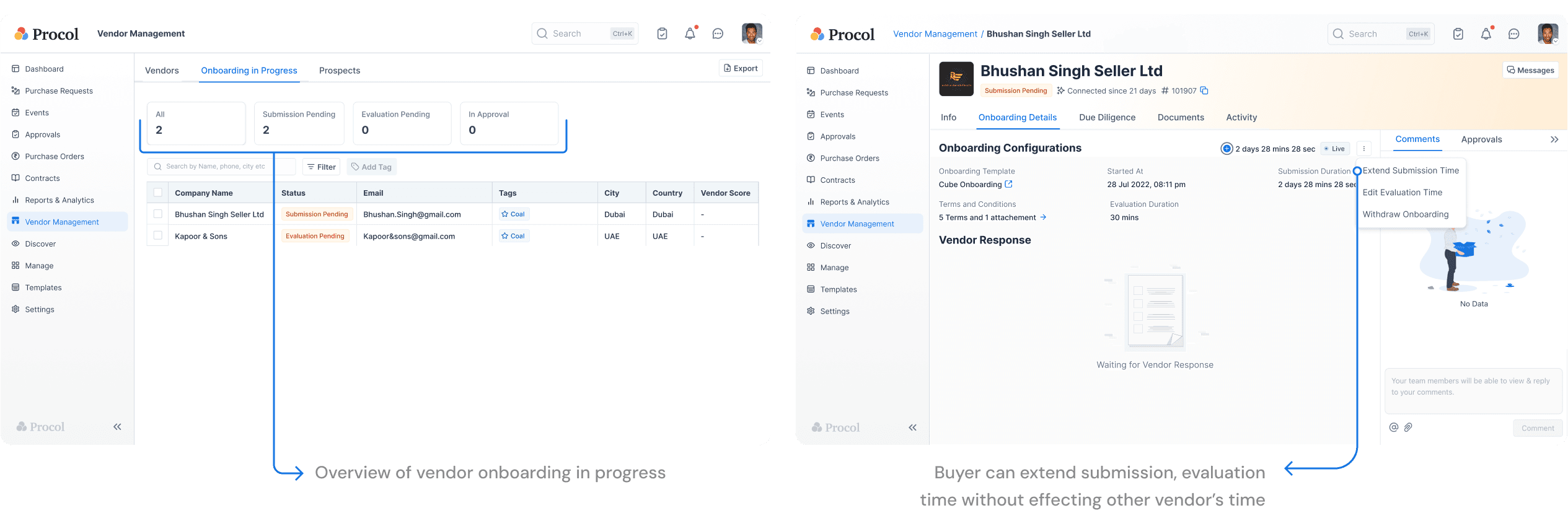
Monitoring And Managing The Onboarding
An “Onboarding in Progress” tab shows every vendor's status. Deadlines and reviews happen on the vendor's profile, without touching anyone else's onboarding.
Step 2
Filling the form
Vendors get an email and fill the form on the vendor portal.
Problem
Issues in old experience
In the previous experience, vendors often struggled to track their form completion progress, leading to frustration and uncertainty. Additionally, the vendor experience had to make room for new features like auto-verification, question groups, and dynamic forms.
Solution
New experience
Step 3
Reviewing response and initiating approvals
The buyer reviews the response and starts an approval chain with other stakeholders.
Problem → Solution
What changed
- Buyer
Key actions pinned in view
Approve and Reject were hidden inside a three-dot menu.
DiscoverabilityEfficiency - Buyer
Verified fields flagged
Long answers were cut off, so buyers hovered to read each one.
ReadabilityEfficiency
| User | Problem | Problem type | Solution |
|---|---|---|---|
Buyer | Approve and Reject were hidden inside a three-dot menu. | DiscoverabilityEfficiency | Key actions pinned in view |
Buyer | Long answers were cut off, so buyers hovered to read each one. | ReadabilityEfficiency | Verified fields flagged |
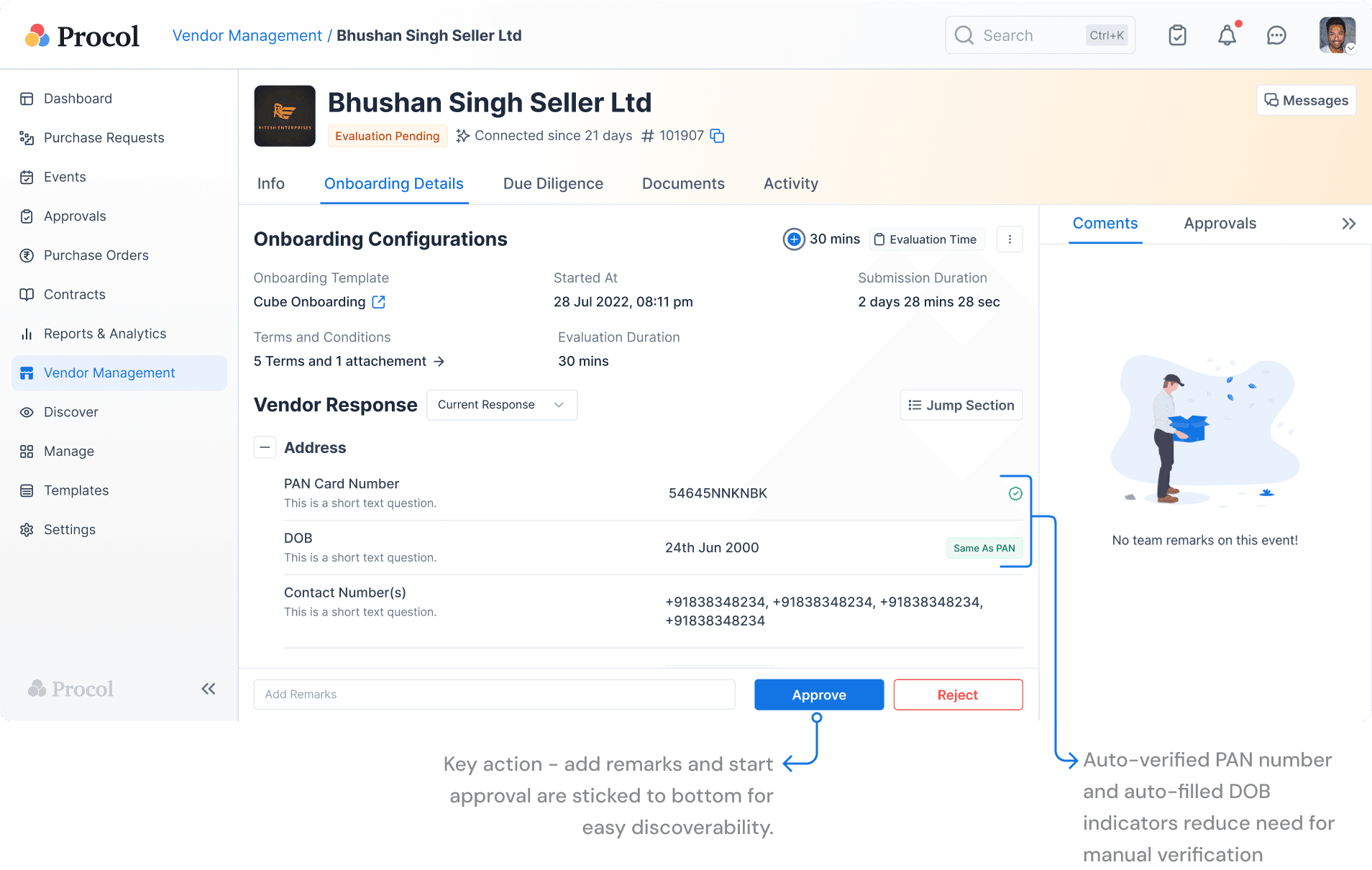
Solution
New experience
Key actions stay pinned to the bottom, and auto-verified fields are flagged so there's less to check by hand.
Post onboarding
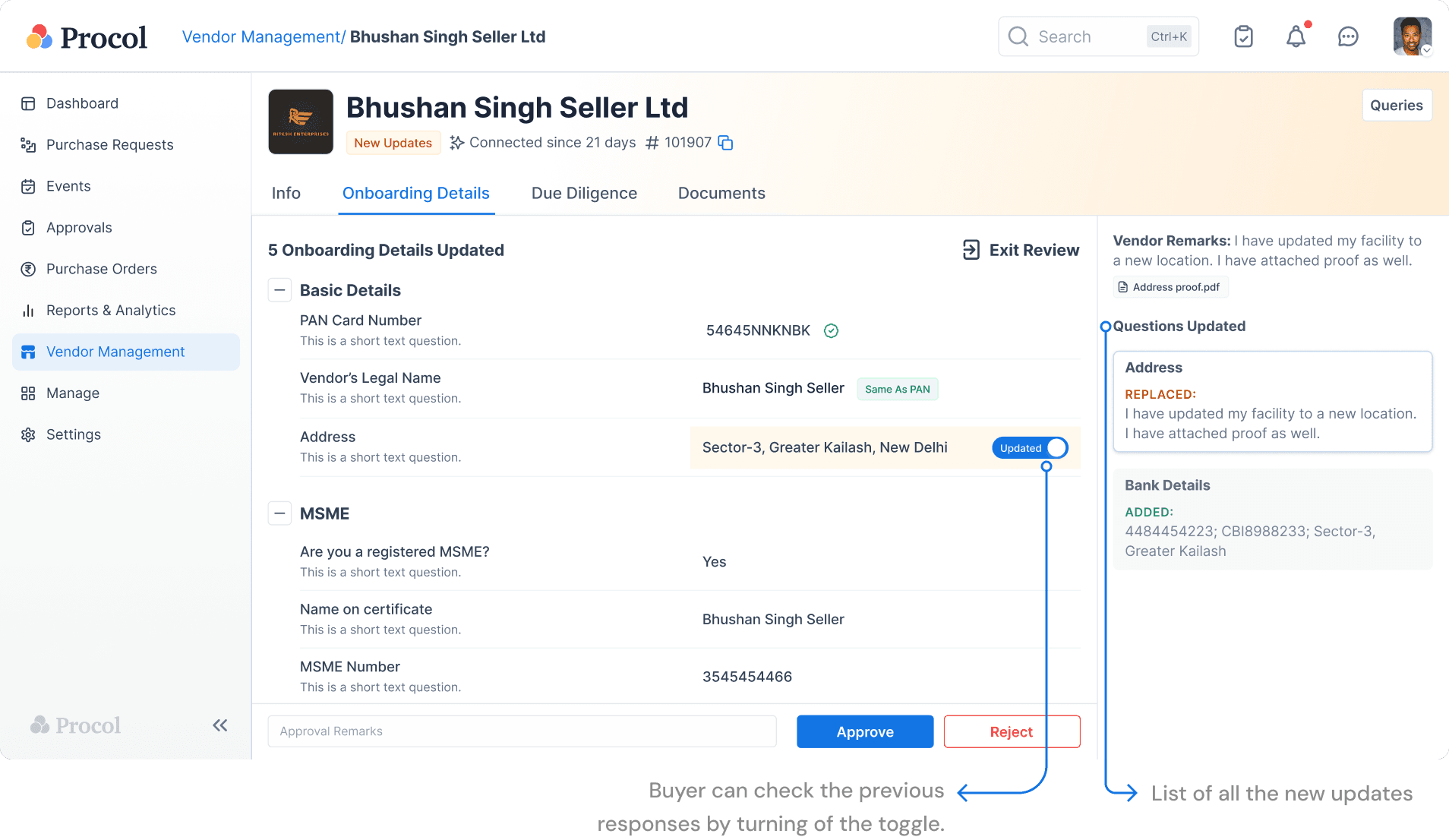
Updating Onboarding details
Vendors couldn't update their details once onboarded, so data went stale. Now they can, through a business partner profile.
Vendor edits details
On their business partner profile
Buyer reviews the changes
Updates applied
Data stays accurate
Vendor editing details
Buyer reviewing the updates
Outcome
Results and Future Scope
Phased rollout
Released in phases, tested with clients through UATs at each step.
Positive feedback
Clients liked the usability; their suggestions shaped the final release.
Next up
Machine learning to automate vendor selection and risk profiling.
Reflection
Learnings
Cross-functional collaboration
Working with Eng, CS and Sales kept feasibility, client needs and business goals aligned.
Anticipating breakpoints
Planning for where the design could break made the system sturdier.
Iterate and explain
Sharing the rationale with each iteration built consensus faster.
Contact